Website security is an important part of modern web development and technical SEO. Proper security headers help protect websites against common vulnerabilities such as cross-site scripting, clickjacking, and content injection attacks.
The Security Data tab in CrawlRhino SEO Crawler allows you to quickly analyze the security configuration of a website and identify missing or misconfigured security headers.
This tutorial explains how to review website security settings using CrawlRhino SEO Crawler.
Running a Website Security Check

To analyze website security headers:
- Start a crawl using CrawlRhino SEO Crawler.
- Allow the crawl to complete.
- Navigate to the Security Data tab in the crawl results.
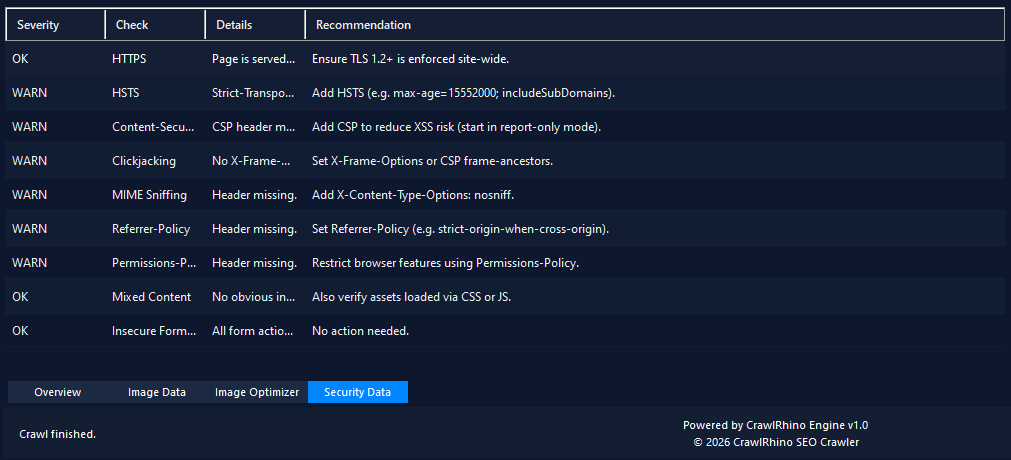
CrawlRhino will display a list of security checks performed on the scanned pages.
Each result includes:
- severity level
- security check type
- detected issue
- recommended fix
This allows you to quickly identify potential security misconfigurations.
Understanding Security Data Results
The Security Data table shows several columns that help explain each detected issue.
Severity
Indicates the importance of the security check result.
Common values include:
- OK – no issue detected
- WARN – a potential security improvement is recommended
Check
Displays the type of security check performed.
Examples include:
- HTTPS
- HSTS
- Content Security Policy
- Clickjacking protection
- MIME sniffing protection
Details
Provides a brief explanation of the detected configuration or missing header.
Recommendation
Provides guidance on how the issue can be fixed or improved.
These recommendations help developers quickly implement stronger security policies.
Security Checks Performed by CrawlRhino
CrawlRhino SEO Crawler performs several common website security checks.
HTTPS
Ensures that the website is served over HTTPS.
HTTPS encrypts communication between the browser and server, protecting sensitive data from interception.
Google also considers HTTPS a ranking signal, making it important for SEO.
HSTS (Strict-Transport-Security)
The HSTS header forces browsers to use HTTPS when accessing the website.
Without HSTS, users may still access insecure HTTP versions of pages.
CrawlRhino checks whether this header is configured properly.
Content Security Policy (CSP)
The Content Security Policy header helps prevent cross-site scripting (XSS) attacks by controlling which resources can be loaded by the browser.
Missing or weak CSP rules can increase security risks.
Clickjacking Protection
Clickjacking attacks attempt to trick users into clicking hidden elements.
This can be prevented using the X-Frame-Options header or the frame-ancestors directive in CSP.
CrawlRhino checks whether clickjacking protection is configured.
MIME Sniffing Protection
Browsers may attempt to interpret files as different content types.
The X-Content-Type-Options: nosniff header prevents this behaviour and improves security.
Referrer Policy
The Referrer-Policy header controls how much information is sent when users navigate between websites.
Proper configuration can help protect user privacy.
Permissions Policy
The Permissions-Policy header allows websites to control browser features such as:
- camera access
- microphone access
- geolocation
Restricting unnecessary features improves overall security.
Mixed Content
Mixed content occurs when HTTPS pages load assets using HTTP.
This can weaken security and trigger browser warnings.
CrawlRhino helps identify potential mixed content issues.
Insecure Form Actions
Forms that submit data over HTTP instead of HTTPS may expose sensitive information.
CrawlRhino checks whether forms are submitted securely.
Why Security Headers Matter
While security headers are primarily designed to protect websites and users, they also contribute to better website quality.
Benefits include:
- improved website security
- stronger browser protection
- better user trust
- improved HTTPS compliance
Maintaining strong security configurations helps ensure your website follows modern web standards.
Next Step
After reviewing the Security Data tab, you can continue analyzing other areas of your crawl results using CrawlRhino SEO Crawler, including:
- broken links
- image optimization opportunities
- JavaScript rendering analysis
- technical SEO issues
Download CrawlRhino SEO Crawler
If you want to perform detailed website audits and technical SEO analysis, CrawlRhino provides a fast and powerful alternative to traditional SEO spider software.
You can download CrawlRhino and start crawling websites immediately.