
A website sitemap helps search engines discover and index the pages on your website. Checking that your sitemap exists and loads correctly is an important part of technical SEO.
The CrawlRhino SEO Crawler includes a built-in sitemap viewer that automatically detects sitemap files on a website. This allows you to quickly find and verify a website sitemap during a crawl.
This guide explains how to find and check a website sitemap using CrawlRhino SEO Crawler.
What Is a Website Sitemap?
A sitemap is a file that lists the important URLs on a website. It helps search engines like Google understand the structure of your site and discover pages that should be indexed.
Most websites use an XML sitemap, which is commonly located at one of these URLs:
/sitemap.xml
/sitemap_index.xml
/wp-sitemap.xml
Some websites use sitemap index files, which contain links to multiple sitemaps such as:
- post sitemaps
- page sitemaps
- category sitemaps
- image sitemaps
Checking your sitemap helps ensure:
- Your pages can be discovered by search engines
- The sitemap loads correctly
- Important URLs are included
- There are no broken sitemap links
How to Find a Website Sitemap
Before analysing a sitemap, you first need to locate it.
Common ways to find a website sitemap include:
- Visiting example.com/sitemap.xml
- Checking robots.txt for sitemap references
- Looking for sitemap index files
- Using an SEO crawler like CrawlRhino SEO Crawler
CrawlRhino automatically checks the website for sitemap files and displays them after a crawl.
How to Check a Website Sitemap Using CrawlRhino SEO Crawler
Follow these steps to view and verify a website sitemap.
1. Crawl the Website
Open CrawlRhino SEO Crawler and enter the website URL you want to analyse.
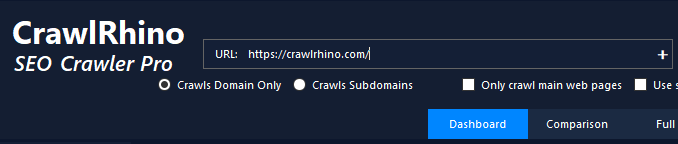
Start the crawl and allow the crawler to scan the website pages.
Once the crawl finishes, the analysis tools become available.
2. Open the Sitemap Tool
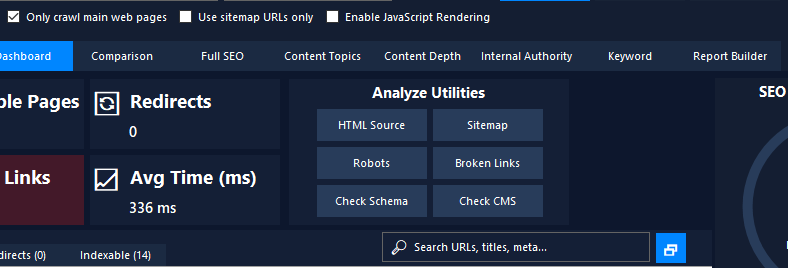
In the Analyze Utilities section, click:
Sitemap
CrawlRhino SEO Crawler will automatically check the website for sitemap files.
If a sitemap is found, the sitemap URL will be detected and displayed.
3. View the Sitemap in the Overview Tab
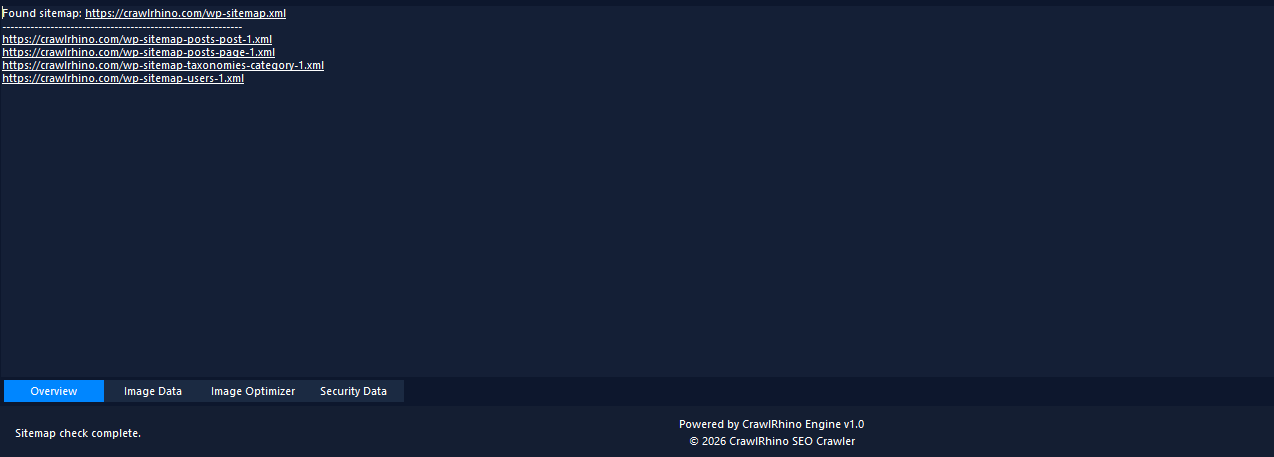
When a sitemap is detected, CrawlRhino displays it in the Overview tab.
You will see:
- the main sitemap URL
- any sitemap index files
- additional sitemap files linked from the main sitemap
This allows you to quickly confirm that the sitemap exists and is accessible.
4. Open Sitemap Files in Your Browser
Each sitemap link displayed in CrawlRhino SEO Crawler is clickable.
Click any sitemap URL and it will automatically open in your default web browser.
This allows you to inspect the sitemap file and verify that the XML sitemap loads correctly.
How to Check If a Website Has a Sitemap
If CrawlRhino does not detect a sitemap, the website may not have one configured.
You can also manually check common sitemap locations such as:
example.com/sitemap.xml
example.com/sitemap_index.xml
example.com/wp-sitemap.xml
If none of these files exist, the website may need a sitemap to help search engines discover its pages.
Why Checking Your Sitemap Matters for SEO
Regularly checking your sitemap helps identify technical SEO issues that can affect search engine crawling and indexing.
Common sitemap issues include:
- missing sitemap files
- broken sitemap URLs
- incorrect sitemap structure
- important pages missing from the sitemap
- search engines unable to access the sitemap
Using CrawlRhino SEO Crawler makes it quick and easy to locate and verify sitemap files during a technical SEO audit.
Summary
The Sitemap tool in CrawlRhino SEO Crawler allows you to quickly find and verify a website sitemap.
The process is simple:
- Crawl the website
- Click Sitemap in the Analyze Utilities panel
- View the sitemap in the Overview tab
- Click any sitemap URL to open it in your browser
This helps ensure your sitemap is accessible and correctly configured for search engines.
Download CrawlRhino SEO Crawler
If you want to perform detailed website audits and technical SEO analysis, CrawlRhino provides a fast and powerful alternative to traditional SEO spider software.
You can download CrawlRhino and start crawling websites immediately.