Images play an important role in both website performance and SEO. Large images can slow down page loading times, while missing alt text can make it harder for search engines to understand image content.
CrawlRhino SEO Crawler includes an Image Data analysis feature that scans all images discovered during a website crawl and provides detailed information about their size, dimensions, and SEO attributes.
This page explains how to use CrawlRhino SEO Crawler to analyze images on a website and identify potential optimization opportunities.
Why Image Analysis Matters for SEO
Images can affect website performance and search engine visibility in several ways.
Page Speed
Large images increase page size and can slow down page load times. Optimizing images can improve website performance and Core Web Vitals metrics.
Accessibility
Alt text helps screen readers describe images to users with visual impairments. Missing alt attributes can reduce website accessibility.
Image SEO
Search engines rely on alt text and surrounding content to understand images. Properly optimized images can appear in Google Image Search and contribute to overall SEO performance.
Accessing Image Data in CrawlRhino SEO Crawler
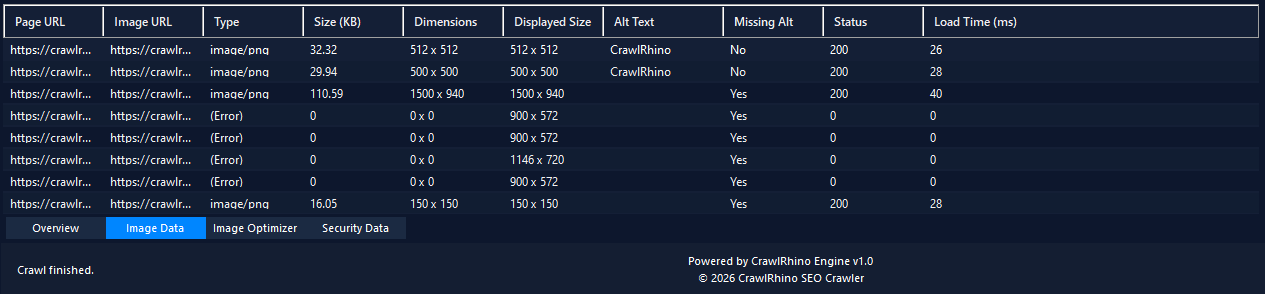
Image analysis is available in the Image Data tab within the CrawlRhino dashboard.

After completing a crawl:
- Select the Image Data tab.
- CrawlRhino SEO Crawler will display a table containing all images discovered during the crawl.
This table allows you to quickly review image details and identify potential issues.
Image Data Overview
The Image Data table includes several columns that provide information about each discovered image.
Page URL
The page where the image was found.
This helps identify which pages contain specific images.
Image URL
The direct URL of the image file.
This allows you to locate the image within your website structure.
Image Type
The file format of the image.
Common types include:
image/png
image/jpeg
image/webp
image/svg
Different formats can impact image size and performance.
Image Size
Displays the file size of the image in kilobytes (KB).
Large images may negatively affect page load times and should often be compressed or resized.
Image Dimensions
Shows the original dimensions of the image.
Large images that are displayed at smaller sizes may waste bandwidth.
Displayed Size
Shows the size the image is displayed at within the webpage.
If the displayed size is significantly smaller than the original image dimensions, the image may be unnecessarily large.
Alt Text
Displays the alt attribute associated with the image.
Alt text helps search engines understand the content of an image and improves accessibility.
Missing Alt
Indicates whether an image is missing alt text.
Images without alt text may represent missed SEO and accessibility opportunities.
Status Code
Shows the HTTP response returned when requesting the image.
Examples include:
200 OK
404 Not Found
Broken image links can negatively affect user experience.
Image Load Time
Displays the time required to load the image.
Slow-loading images may indicate large file sizes or server performance issues.
Identifying Image SEO Issues
Using the Image Data table, you can quickly identify several common image SEO problems.
Missing Alt Text
Images marked with Missing Alt: Yes indicate that the image does not include an alt attribute.
Adding descriptive alt text helps improve accessibility and image SEO.
Oversized Images
Images with large file sizes may slow down page loading times.
Compressing these images can improve website performance.
Large Dimension Images
Images with very large dimensions that are displayed at smaller sizes may waste bandwidth.
Resizing images to match their display size can reduce unnecessary data transfer.
Broken Images
Images that return error responses (such as 404) indicate missing or incorrectly linked image files.
These should be corrected to prevent broken visuals on the page.
Improving Image SEO
After identifying image issues, you can improve image performance by:
- adding descriptive alt text
- compressing large images
- resizing oversized images
- replacing broken image links
- using modern formats such as WebP
Optimizing images can significantly improve website speed, accessibility, and search engine performance.
Next Step
After analyzing image data, you can further optimize images using CrawlRhino’s Image Optimizer feature.
This tool helps compress and resize images to improve website performance.
Download CrawlRhino SEO Crawler
If you want to perform detailed website audits and technical SEO analysis, CrawlRhino provides a fast and powerful alternative to traditional SEO spider software.
You can download CrawlRhino and start crawling websites immediately.