
Modern websites often rely heavily on JavaScript to load content dynamically. Traditional website crawlers that only read the initial HTML may miss important content that appears after scripts execute.
CrawlRhino includes a JavaScript rendering engine that allows the crawler to load and render web pages the same way a modern browser does. This makes it possible to analyze websites built with JavaScript frameworks and detect SEO issues that may not appear in the raw HTML.
This page explains how JavaScript rendering works in CrawlRhino and when you should enable it during a website crawl.
Why JavaScript Rendering Is Important for SEO
Many modern websites are built using JavaScript frameworks such as:
- React
- Angular
- Vue
These frameworks often load content dynamically after the page loads.
If a crawler only reads the initial HTML response, it may not detect:
- page content
- internal links
- headings
- metadata
- structured data
JavaScript rendering allows CrawlRhino to execute scripts and analyze the fully rendered page, ensuring that dynamically generated content is included in the crawl results.
This helps identify SEO issues that might prevent search engines from properly indexing the website.
Enabling JavaScript Rendering
JavaScript rendering can be enabled directly from the CrawlRhino dashboard before starting a crawl.
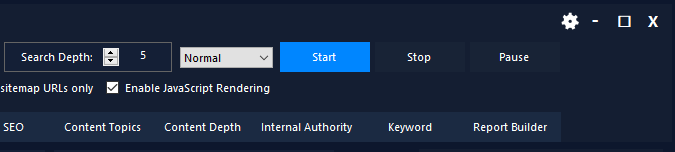
To enable rendering:
- Enter the website URL.
- Configure the crawl settings if needed.
- Enable the JavaScript Rendering option.
- Click Start to begin the crawl.
When this option is enabled, CrawlRhino will render each page using a browser engine before analyzing the page content.
Installing the Chromium Rendering Engine
JavaScript rendering requires a Chromium browser engine to render pages.
If Chromium is not already installed, CrawlRhino will display a message asking if you want to install the required rendering engine.
Click Yes to download and install Chromium automatically.
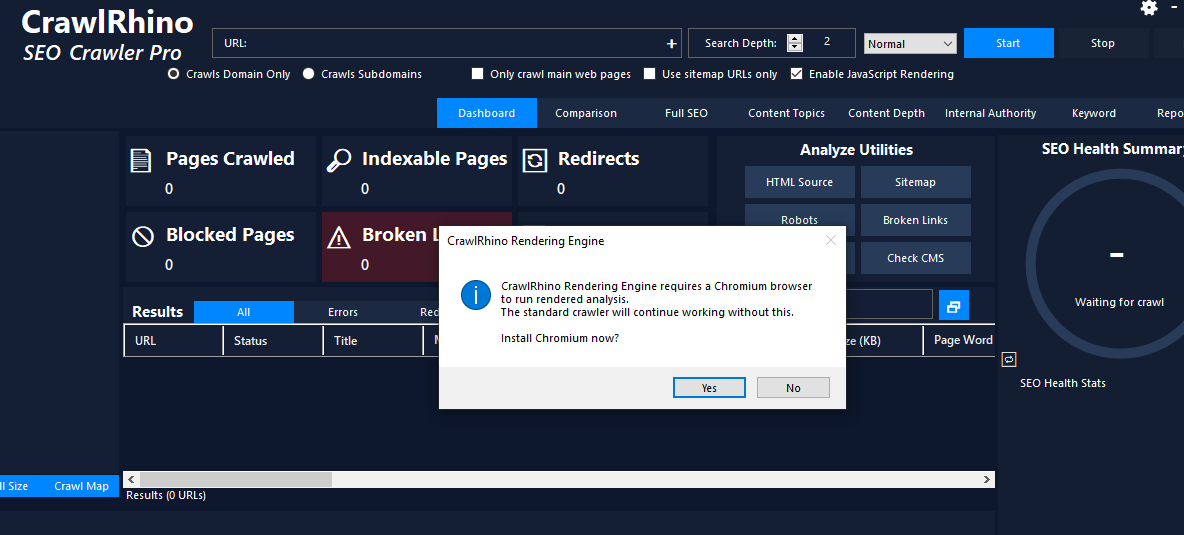
Once installed, CrawlRhino will be able to perform rendered crawls and analyze JavaScript-driven content.
If you choose No, the crawler will continue using the standard HTML crawler, but some dynamically generated content may not be detected.
What CrawlRhino Analyzes After Rendering
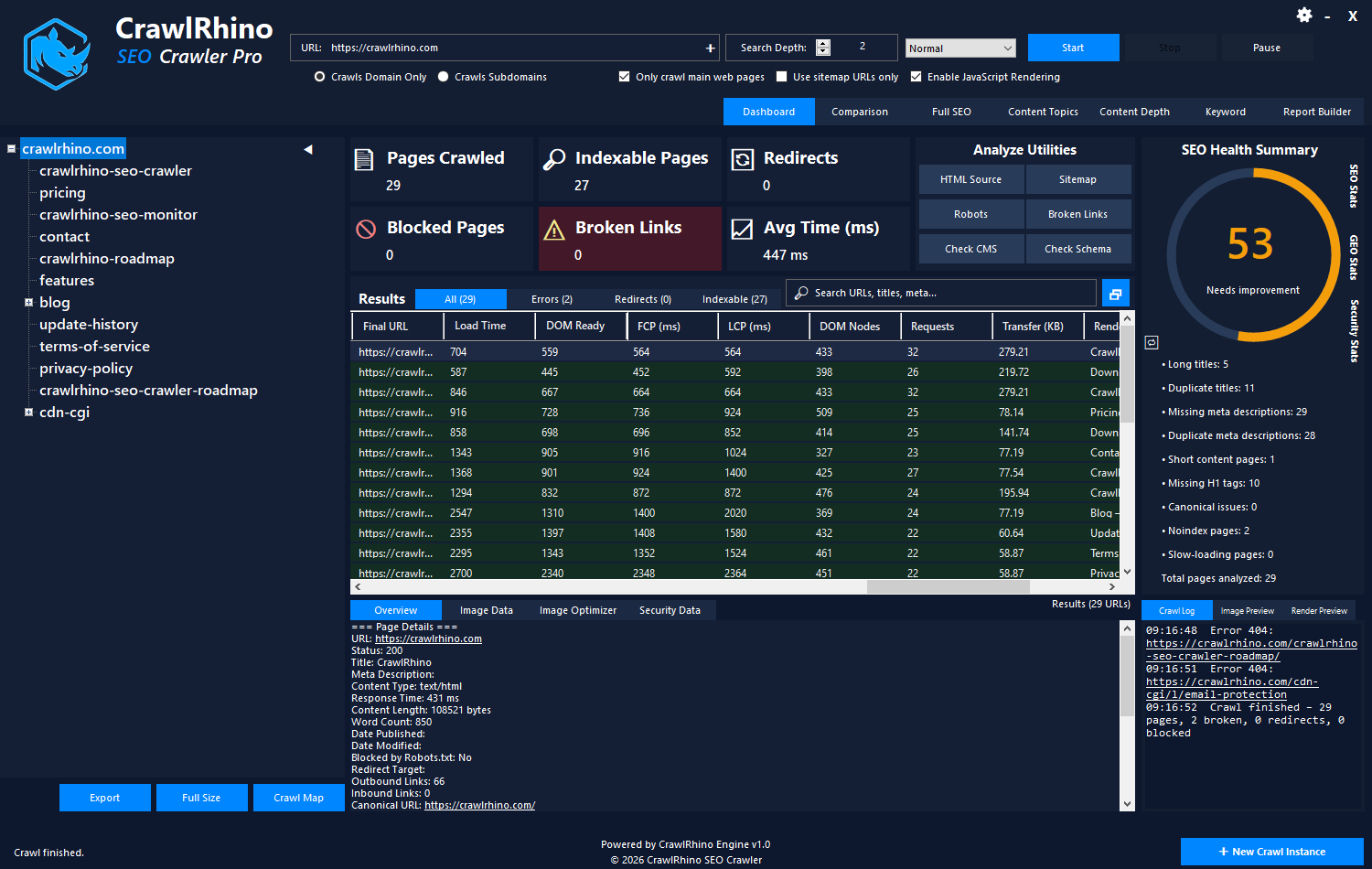
After rendering a page with JavaScript enabled, CrawlRhino captures information about how the page loads and what content appears after scripts execute.
The rendered analysis currently includes data such as:
- Final URL after any client-side redirects
- Page load timing metrics, including DOM ready time
- Core Web Vitals metrics such as First Contentful Paint (FCP) and Largest Contentful Paint (LCP)
- DOM node count, showing how complex the rendered page structure is
- Network request count, indicating how many resources the page loads
- Transfer size, measuring the total amount of data downloaded
- Rendered page title and meta description detected after JavaScript execution
- Rendered H1 heading extracted from the rendered page
- Screenshot preview of the fully rendered page
This information helps identify issues with JavaScript-heavy websites, such as slow rendering, excessive page complexity, or content that only appears after scripts run.
Additional rendered SEO analysis capabilities will continue to be expanded in future versions of CrawlRhino.
When to Use JavaScript Rendering
JavaScript rendering is recommended when crawling websites that rely heavily on client-side rendering.
Common examples include websites built with:
- React applications
- Angular websites
- Vue.js frontends
- JavaScript-heavy eCommerce sites
If the website loads most of its content using JavaScript, enabling rendering ensures CrawlRhino can detect all pages and analyze them correctly.
When JavaScript Rendering May Not Be Necessary
For traditional websites that deliver content directly in the HTML response, JavaScript rendering may not be required.
Examples include many:
- WordPress websites
- static HTML websites
- server-side rendered websites
Running a standard crawl without rendering can be faster because pages do not need to be rendered in a browser environment.
Performance Considerations
Rendering JavaScript requires additional processing because each page must be loaded and executed in a browser engine.
As a result:
- rendered crawls may run slower than standard crawls
- large websites may take longer to analyze
For best results, enable JavaScript rendering only when the website requires it.
Verifying Rendered Content
After enabling JavaScript rendering, you can verify how pages are rendered using CrawlRhino’s preview tools.
These tools allow you to view the fully rendered version of a page, including content that appears after JavaScript executes.
The rendered preview allows you to inspect:
- the rendered page screenshot
- rendered page title and meta description
- rendered H1 heading
- page load and rendering performance metrics
This helps confirm that CrawlRhino is correctly detecting content generated by JavaScript and allows you to identify pages where important SEO elements only appear after scripts run.
Download CrawlRhino SEO Crawler
If you want to perform detailed website audits and technical SEO analysis, CrawlRhino provides a fast and powerful alternative to traditional SEO spider software.
You can download CrawlRhino and start crawling websites immediately.