The robots.txt file controls how search engines crawl your website. It tells bots like Googlebot which pages or sections they are allowed to access and which should be blocked.
Checking your robots.txt file is an important part of technical SEO because incorrect rules can accidentally block search engines from crawling important pages.
The CrawlRhino SEO Crawler includes a built-in robots.txt checker and tester that allows you to verify whether a URL is allowed or blocked by a website’s robots.txt rules.
This guide explains how to check robots.txt and test URLs using CrawlRhino SEO Crawler.
What Is a Robots.txt File?
A robots.txt file is a small text file located in the root of a website that tells search engine crawlers how they should interact with the site.
It is typically located at:
example.com/robots.txt
A robots.txt file can contain rules such as:
User-agent: *
Disallow: /admin/
Allow: /
These rules control which parts of a website search engines can crawl.
Why You Should Check Your Robots.txt File
Incorrect robots.txt rules can cause major SEO issues.
For example, a robots.txt file may:
- block search engines from crawling important pages
- prevent indexing of content
- restrict entire sections of a website
- hide resources like images or scripts
Using a robots.txt checker helps verify that important URLs are not accidentally blocked.
How to Check Robots.txt Using CrawlRhino SEO Crawler
Follow these steps to test robots.txt rules and check whether a URL is allowed.
1. Crawl the Website
Open CrawlRhino SEO Crawler and enter the website URL you want to analyse.
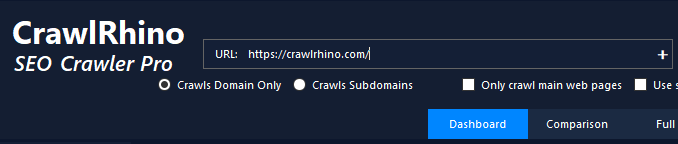
Start the crawl and allow the crawler to scan the website pages.
Once the crawl is complete, the analysis tools will become available.
2. Open the Robots.txt Tester
In the Analyze Utilities panel, click:
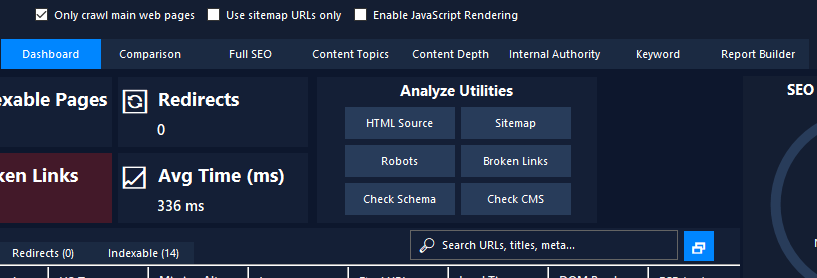
Robots
This opens the Robots.txt Tester tool.
3. Enter the URL You Want to Test
Inside the tester window, enter the full URL you want to check against the website’s robots.txt file.
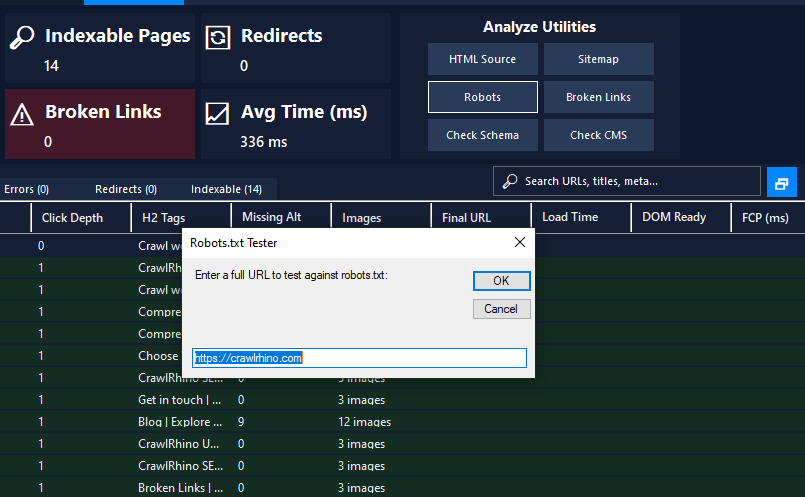
For example:
https://example.com/page-url
Click OK to run the robots.txt test.
4. View the Robots.txt Rules
CrawlRhino will automatically retrieve the website’s robots.txt file and display its rules.
You will see directives such as:
User-agent: *
Disallow: /wp-admin/
Allow: /wp-admin/admin-ajax.php
These rules define how search engines are allowed to crawl the website.
5. Check the Robots.txt Test Result
After testing the URL, CrawlRhino will show the result indicating whether the page is allowed or blocked.
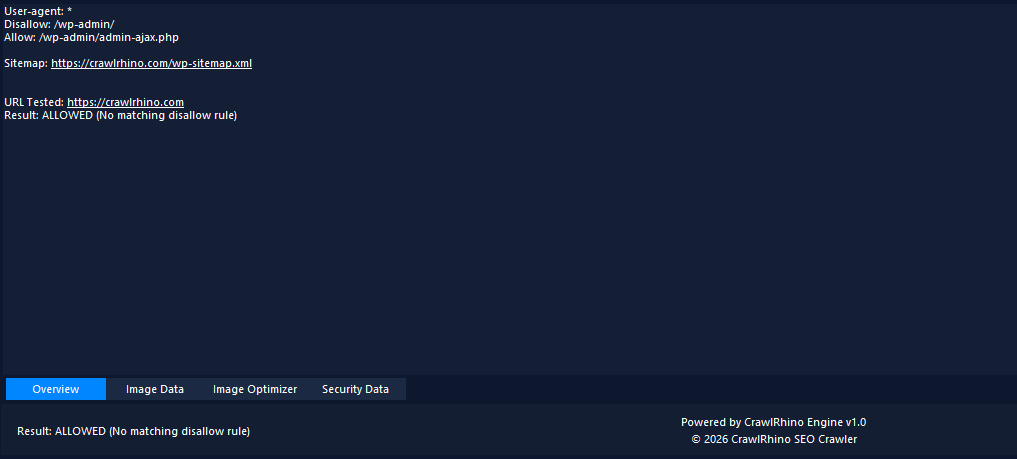
Example result:
URL Tested: https://example.com/page
Result: ALLOWED (No matching disallow rule)
If the URL is blocked by robots.txt, the result will show that the page is disallowed.
This allows you to quickly verify whether important pages can be crawled by search engines.
What to Look for When Testing Robots.txt
When checking robots.txt files, it is important to verify:
- important pages are not blocked
- crawl rules are correctly configured
- unnecessary directories are not restricted
- sitemap references are included
A correctly configured robots.txt file helps search engines crawl your site efficiently.
Common Robots.txt Rules
Some commonly used robots.txt directives include:
Allow search engines to crawl everything
User-agent: *
Disallow:
Block a specific directory
User-agent: *
Disallow: /private/
Block all bots
User-agent: *
Disallow: /
These rules control how search engines access your website.
Summary
The CrawlRhino SEO Crawler robots.txt checker allows you to quickly test robots.txt rules and verify whether URLs are allowed to be crawled.
To check robots.txt using CrawlRhino:
- Crawl the website
- Click Robots in the Analyze Utilities panel
- Enter the URL you want to test
- Run the robots.txt test
- Review whether the URL is allowed or blocked
This makes it easy to diagnose robots.txt issues and ensure your website can be crawled correctly by search engines.
Download CrawlRhino SEO Crawler
If you want to perform detailed website audits and technical SEO analysis, CrawlRhino provides a fast and powerful alternative to traditional SEO spider software.
You can download CrawlRhino and start crawling websites immediately.