
Many websites are built using a Content Management System (CMS) such as WordPress, Shopify, Joomla, or Drupal. These platforms control how a website is created, edited, and managed.
Knowing what CMS a website uses can help with:
- SEO competitor analysis
- website technology research
- identifying plugins and themes
- understanding site structure
- planning website migrations
With CrawlRhino SEO Crawler, you can quickly check the CMS of a website and see what platform powers it.
This guide explains how to use the CrawlRhino CMS checker to detect the platform behind any website.
What Is a CMS?
A Content Management System (CMS) is software used to create and manage website content without needing to write code manually.
Some of the most common CMS platforms include:
- WordPress
- Shopify
- Joomla
- Drupal
- Magento
- Wix
- Squarespace
These systems power millions of websites and often leave identifiable patterns within the website’s HTML source.
A website CMS checker like CrawlRhino can analyse those patterns to determine what platform a site is using.
Why Check What CMS a Website Uses?
Checking the CMS of a website is useful for many reasons.
Competitor SEO analysis
Understanding the platform competitors use can reveal how they manage SEO features such as:
- metadata
- sitemaps
- schema markup
- plugins
Technology research
If you are researching how a site is built, detecting the CMS helps identify:
- frameworks
- themes
- plugins
- development structure
Website migration planning
When rebuilding or migrating a site, knowing the CMS can help you understand the site’s architecture and limitations.
How to Check a Website CMS Using CrawlRhino SEO Crawler
Follow these steps to check the CMS of a website using CrawlRhino.
1. Crawl the Website
Open CrawlRhino SEO Crawler and enter the website URL you want to analyse.
Start the crawl so the crawler can scan the website pages and collect technical information.
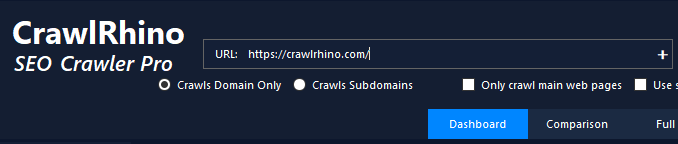
Once the crawl completes, CrawlRhino will have gathered data about the website’s structure and source code.
2. Open the CMS Checker Tool
After crawling the site, go to the Analyze Utilities panel.
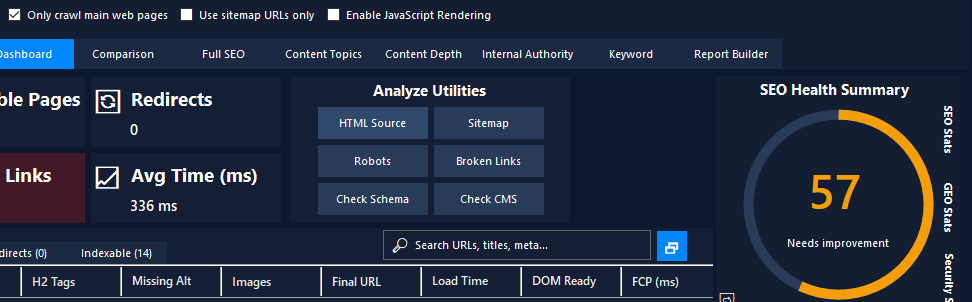
Click:
Check CMS
This opens the CMS detection tool, which scans the HTML source code for CMS indicators.
3. View the Detected CMS Platform
CrawlRhino will analyse the website’s code and display the detected platform.
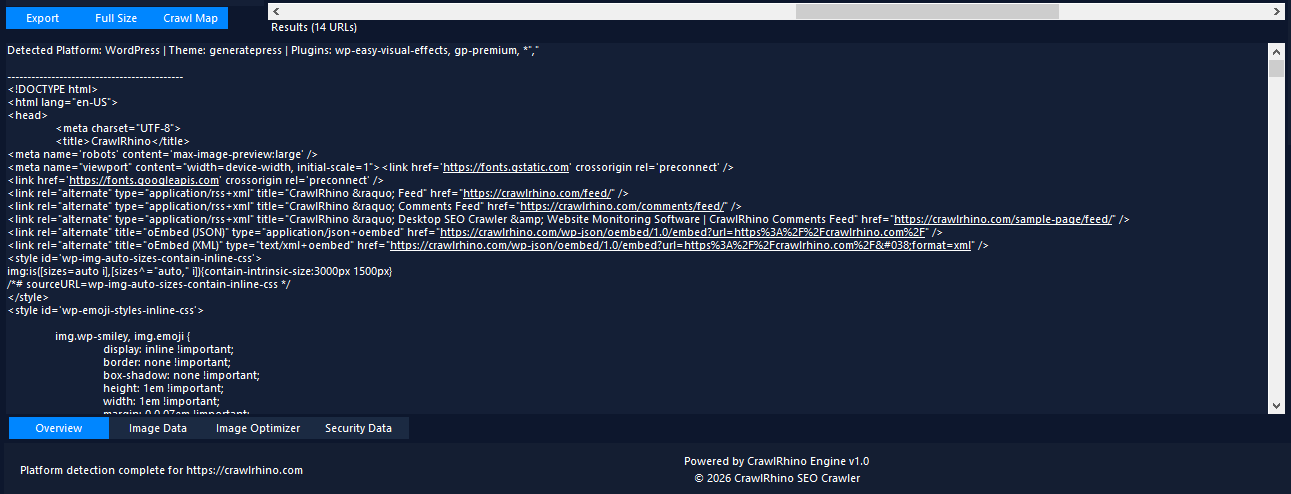
Example output:
Detected Platform: WordPress
Theme: generatepress
Plugins: wp-easy-visual-effects, gp-premium
This information shows:
- the CMS platform
- the website theme
- detected plugins or extensions
This makes CrawlRhino a fast and effective website CMS checker.
4. Review the Source Code Indicators
CrawlRhino identifies CMS platforms by analysing patterns in the website’s code.
For example, WordPress sites often contain directories such as:
/wp-content/
/wp-includes/
Other CMS platforms may reveal themselves through:
- JavaScript files
- CSS directories
- plugin references
- meta generator tags
By scanning these indicators, CrawlRhino can determine what CMS the website is running.
How to Check What CMS a Website Is Using Manually
Although tools like CrawlRhino make it easy to detect a CMS automatically, you can sometimes identify a platform manually.
Here are a few quick methods.
Check the page source
Right-click the website and select View Page Source.
Look for indicators such as:
<meta name="generator" content="WordPress">
Look for CMS-specific directories
Many CMS platforms use distinctive file paths.
Examples include:
WordPress
/wp-content/
/wp-includes/
Shopify
cdn.shopify.com
Drupal
/sites/default/
Check scripts and plugins
JavaScript or CSS files may reveal plugin names, frameworks, or CMS components.
However, manual detection can be slow and unreliable.
Using a CMS checker tool like CrawlRhino is usually much faster and more accurate.
Common CMS Platforms CrawlRhino Can Detect
The CrawlRhino CMS checker can identify many popular platforms, including:
- WordPress
- Shopify
- Joomla
- Drupal
- Magento
- Wix
- Squarespace
It can also detect themes, plugins, and platform indicators that reveal how the website is built.
When CMS Detection Is Useful for SEO
CMS detection can be helpful during technical SEO audits.
For example, detecting a WordPress SEO plugin might explain how the site handles:
- metadata
- canonical tags
- sitemaps
- structured data
It can also reveal whether a website relies on a framework that affects page performance or indexing.
Summary
The CrawlRhino CMS checker allows you to quickly detect what platform a website is built with.
To check a website CMS using CrawlRhino:
- Crawl the website with CrawlRhino SEO Crawler
- Click Check CMS in the Analyze Utilities panel
- View the detected CMS platform
- Review detected themes and plugins
This makes it easy to check the CMS of any website, analyse competitors, and understand how websites are built.
Download CrawlRhino SEO Crawler
If you want to perform detailed website audits and technical SEO analysis, CrawlRhino provides a fast and powerful alternative to traditional SEO spider software.
You can download CrawlRhino and start crawling websites immediately.